Don't Buy the Acer Vero B247Y Business Monitor Until You Read This Full Analysis
In the rapidly evolving landscape of office hardware, the "business monitor" has undergone a significant transformation. No longer is it merely a functional screen for spreadsheets and emails; it has become a central hub for productivity, ergonomic health, and, increasingly, corporate social responsibility. The Acer Vero B247Y stands at the intersection of these trends, marketed under Acer's "Vero" umbrella—a line specifically designed to appeal to eco-conscious buyers and organizations looking to reduce their carbon footprint without sacrificing performance.
However, the business monitor market is saturated with options from industry giants like Dell, HP, and Lenovo. Choosing a display for a professional environment requires more than just looking at a spec sheet; it requires an understanding of how that hardware integrates into a daily workflow. This analysis dives deep into the Acer Vero B247Y, exploring whether its "green" credentials are backed by the utility required for a forty-hour work week, or if it is a niche product that prioritizes sustainability at the expense of vision comfort and build quality.
The Vero Philosophy: Sustainability in the Workspace
Before examining the technical performance of the B247Y, it is essential to understand why this monitor exists. The Vero line is Acer’s answer to the growing demand for sustainable electronics. Electronics manufacturing is notoriously resource-intensive, involving rare earth minerals and significant plastic waste. Acer has addressed this by utilizing Post-Consumer Recycled (PCR) plastics in the construction of the monitor’s chassis and stand. Specifically, the B247Y utilizes 35% PCR plastic, which is a significant step above the industry standard for entry-to-mid-range business displays.
Furthermore, the packaging is 100% recyclable. For a single home user, this might feel like a minor detail, but for a procurement manager ordering 500 units for a new corporate headquarters, the reduction in non-recyclable waste is a substantial logistical and environmental benefit. The monitor is also EPEAT Gold and ENERGY STAR certified, ensuring that its operational power consumption remains low throughout its lifecycle. For businesses aimed at achieving ESG (Environmental, Social, and Governance) targets, the B247Y offers a tangible way to align hardware procurement with corporate values.
Technical Specifications and Performance Analysis
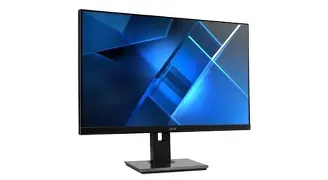
The Acer Vero B247Y is a 23.8-inch display featuring an In-Plane Switching (IPS) panel. It offers a standard Full HD resolution of 1920 x 1080. While high-resolution 4K monitors are becoming more common, the 1080p resolution on a 24-inch screen remains the "sweet spot" for many business applications. It provides a pixel density of approximately 92 pixels per inch (PPI), which results in crisp text and enough screen real estate to view two documents side-by-side without excessive scaling issues.
Panel Quality and Color Accuracy
The choice of an IPS panel is critical for a business environment. Unlike older Twisted Nematic (TN) panels or even some Vertical Alignment (VA) panels, IPS technology provides wide viewing angles of 178 degrees both horizontally and vertically. This is vital in a collaborative office where colleagues might be looking at your screen from the side. On the B247Y, colors remain consistent and the image does not wash out when viewed off-center.
In terms of color reproduction, the B247Y covers 100% of the sRGB color gamut. While this is not sufficient for professional video editors or high-end photographers who require Adobe RGB or DCI-P3 coverage, it is more than adequate for general business tasks, web design, and presentation building. The colors are vibrant without being oversaturated, and the factory calibration is generally neutral, preventing the "yellowish" or "bluish" tints often seen in budget-oriented displays.
Motion and Responsiveness
With a 75Hz refresh rate, the B247Y offers a slightly smoother experience than the standard 60Hz monitors found in most offices. While 15Hz might seem negligible, it reduces eye strain during prolonged periods of scrolling through long PDFs or complex spreadsheets. The 4ms response time (Gray-to-Gray) ensures that there is no noticeable ghosting during video conferencing or standard office animations. This makes it a versatile tool for general administrative work as well as lite multimedia consumption.
Ergonomics and Build Design
Business users often spend eight or more hours a day in front of their screens, making ergonomics a non-negotiable factor. The B247Y excels in this department. The monitor features what Acer calls the "ErgoStand," which allows for a high degree of flexibility. Users can adjust the height up to 120mm, tilt the screen from -5 to 25 degrees, swivel it 45 degrees in either direction, and pivot it 90 degrees into portrait mode.
The portrait mode is particularly useful for software developers, data analysts, and legal professionals who regularly work with long columns of code or vertically oriented documents. The movement of the stand is smooth and provides enough resistance to stay in place without the need for locking mechanisms. Despite being made of recycled plastics, the chassis feels robust. It lacks the "flex" and creaking often associated with lower-end plastic monitors, suggesting a level of durability suitable for high-traffic office environments.
Connectivity and Integrated Features
A business monitor is only as good as its ability to connect to various devices. The B247Y includes a standard array of ports: one HDMI 1.4 port, one DisplayPort 1.2, and even a VGA port for legacy systems. The inclusion of VGA is a thoughtful touch for businesses that still utilize older desktop towers or specialized industrial equipment. However, the lack of a USB-C port with Power Delivery is a notable omission in the current market. Many modern laptops utilize USB-C for video output and charging, and the B247Y requires users to use a separate power brick for their laptop and a traditional video cable.
Discover deals on Electronics — updated daily.
View Offers →The monitor also features built-in 2W speakers. While these are not high-fidelity and lack any meaningful bass, they are perfectly functional for hearing notification sounds, attending a quick Zoom meeting without headphones, or watching internal training videos. For a professional setting, they eliminate the need for cluttered external speakers on the desk.
Vision Health: Acer VisionCare
One of the most praised features of the B247Y is the suite of Acer VisionCare technologies. This includes BlueLightShield, Flicker-less technology, and ComfyView. Occupational eye strain is a significant concern for desk workers, and these features work together to mitigate the harshness of the backlight. The Flicker-less technology eliminates the invisible flickering of the screen that often leads to headaches, while the ComfyView matte finish reduces glare from overhead office lights or nearby windows. During testing in a brightly lit environment, the matte coating proved effective at diffusing reflections without making the screen appear "muddy."
Comparison with Competitors
To provide a clearer picture of where the Acer Vero B247Y stands, it is helpful to compare it against other industry leaders in the 24-inch business segment.
| Feature | Acer Vero B247Y | Dell P2422H | HP EliteDisplay E24 G4 |
|---|---|---|---|
| Panel Type | IPS | IPS | IPS |
| Refresh Rate | 75Hz | 60Hz | 60Hz |
| Eco-Friendly | 35% PCR Plastic / Recyclable Box | Standard Plastics | 85% PCR Plastics (Selected Parts) |
| Connectivity | HDMI, DP, VGA | HDMI, DP, VGA, USB Hub | HDMI, DP, VGA, USB Hub |
| Ergonomics | Full (Height, Tilt, Swivel, Pivot) | Full (Height, Tilt, Swivel, Pivot) | Full (Height, Tilt, Swivel, Pivot) |
| Speakers | Integrated 2W x 2 | None | None |
While the Dell and HP models offer a built-in USB hub (allowing you to plug your mouse and keyboard directly into the monitor), the Acer Vero B247Y counters with a higher refresh rate and integrated speakers. The Acer's primary advantage remains its holistic approach to sustainability, which is more integrated into the brand's identity than its competitors' standard office lines.
Pros and Cons: The Detailed Breakdown
Based on our analysis of the hardware and real-world application, here are the primary advantages and disadvantages of the Acer Vero B247Y.
- Significant Sustainability Focus: The use of 35% PCR plastic and fully recyclable packaging makes this one of the greenest options in its price bracket.
- Excellent Ergonomic Stand: The range of physical adjustments allows almost any user to find a comfortable viewing position, reducing neck and back strain.
- Smooth 75Hz Refresh Rate: Offers a slight but noticeable improvement over standard 60Hz displays, making for a much smoother desktop experience.
- Built-in Speakers: Saves desk space and provides adequate audio for basic professional communicating and alerts.
- Wide Viewing Angles: The IPS panel ensures that the image remains consistent for collaborative work and multi-monitor setups.
- No PWM Flickering: The Flicker-less technology effectively prevents eye fatigue during long shifts.
- Lack of USB-C Connectivity: The absence of a single-cable solution for video and power is a drawback for users with modern ultrabooks and MacBooks.
- No Integrated USB Hub: Unlike many other "business" class monitors, it does not offer USB ports for peripheral management.
- 1080p Resolution Limitation: While standard, users who work with high-resolution imagery or massive datasets may find the resolution lacking compared to 1440p or 4K alternatives.
- Basic Audio Quality: The speakers are functional but not suitable for anything beyond basic voice or system sounds.
Real-World Use Cases: Is It Right for You?
To determine if the B247Y is the right investment, consider these typical user profiles and how the monitor meets their specific needs.
The Sustainability-Minded Business
For organizations focused on reducing their environmental impact, the B247Y is a clear winner. It allows procurement departments to meet internal green initiatives without compromising on the basic performance metrics required for staff productivity. The long-term energy savings from its high efficiency rating also contribute to a lower total cost of ownership (TCO).
The Administrative and General Office Worker
For those spending time on emails, word processing, and web-based tools, this monitor is an ideal fit. The VisionCare features make it comfortable for all-day use. The 24-inch size is compact enough to fit on smaller desks or in cubicles while still providing enough screen real estate to work efficiently. In this use case, the lack of USB-C is often overlooked as most office desktops still use traditional DisplayPort or HDMI connections.
The "Portrait Mode" Specialist
Coders and legal professionals who need to read vertically oriented documents will appreciate the pivot function. Because the stand is stable, flipping the monitor into portrait mode doesn't feel precarious. The IPS panel is especially important here; on a TN panel, viewing a screen vertically often causes one eye to see a different color shift than the other, which is incredibly taxing on the brain. The B247Y avoids this entirely.
The Home Office Hybrid Worker
If you are setting up a home office and want a professional look that doesn't scream "gaming monitor," the B247Y’s matte black, minimalist aesthetic fits perfectly. However, if your home setup relies on a modern laptop with limited ports, you will need to invest in a docking station or a monitor with a built-in USB-C hub instead.
Shop the latest Electronics picks on Amazon.
Shop Amazon →Buying Guide: What to Look for in a Business Monitor
When shopping for a display like the Acer Vero B247Y, keep the following criteria in mind to ensure you get the best value for your specific workspace:
1. Panel Type Matters: Always prioritize IPS for business work. The color accuracy and viewing angles are worth the slight price premium over TN or VA panels. For a work monitor, "In-Plane Switching" is the gold standard for daily comfort and collaboration.
2. Don't Skimp on Ergonomics: Many budget monitors come with a "tilt-only" stand. Avoid these for professional use. A height-adjustable stand is crucial for maintaining proper posture. If a monitor doesn't have a good stand, check if it has a VESA mount (like the B247Y does) so you can attach it to a third-party monitor arm.
3. Resolution vs. Screen Size: At 24 inches, 1080p is perfectly fine. If you move up to a 27-inch monitor, however, 1080p might start to look "pixelated." For 27 inches and above, look for QHD (1440p) or 4K to maintain text clarity.
4. Matte vs. Glossy: For an office with windows or bright overhead fluorescent lights, a matte (anti-glare) screen like the one on the B247Y is essential. Glossy screens look pretty in dark rooms but become mirrors in a typical office setting.
5. Certification and Quality Standards: Look for TCO Certification, ENERGY STAR, and EPEAT ratings. These aren't just for the environment; they also indicate a certain level of build quality and operational reliability that generic, unbranded monitors often lack.
Conclusion
The Acer Vero B247Y is a highly specialized tool that succeeds in delivering a professional-grade experience within a sustainable framework. It is not the most technologically advanced monitor on the market—it doesn't offer high-bandwidth USB-C, daisy-chaining capabilities, or ultra-high resolutions. However, for its intended audience, it provides exactly what is needed: a reliable, ergonomic, and eye-friendly display that aligns with modern environmental standards.
Its strengths lie in its exceptional stand versatility, the comfort provided by its IPS panel and flicker-free backlight, and its commitment to reducing plastic waste. While it may not be the primary choice for a creative professional or a power user seeking a one-cable docking solution, it remains an excellent choice for general office environments, education sectors, and any organization prioritizing ESG goals. If you are looking for a straightforward, durable, and eco-friendly 24-inch monitor that covers all the ergonomic bases, the B247Y is a compelling option that proves sustainability and productivity can go hand-in-hand.